
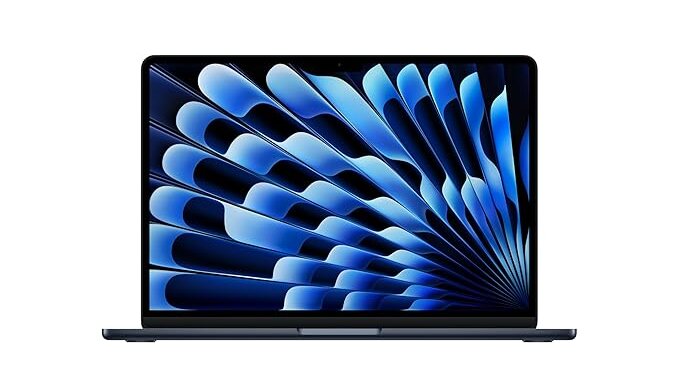
The MacBook Air M4 represents Apple’s latest offering in the ultraportable laptop at ₹99,900 is one of the best laptops you can buy in 2025. But before you spend your hard-earned money, let me break down everything you need to know in simple terms.
Table of Contents
What Makes the MacBook Air M4 Special?
Think of the M4 chip as Apple’s brain for this laptop. It’s like having a really smart assistant that never gets tired. Here’s what that means for you:
Performance You’ll Actually Notice
- Opens apps instantly (no waiting around)
- Handles 30+ browser tabs without slowing down
- Edits 4K videos smoothly
- Runs for 15-18 hours on a single charge
- Stays completely silent (no fan noise ever)
Real Numbers That Matter
- 25% faster than the previous M3 model
- Video editing tasks finish 2 minutes quicker
- Gaming performance improved by 21%
- Battery lasts a full work day plus overtime
Does It Get Too Hot?
Not for normal use, but let me explain.
The MacBook Air doesn’t have a fan (that’s why it’s silent). When you push it really hard for 8-10 minutes straight, it slows down to prevent overheating. Here’s when this matters:
You’ll Notice Slowdown If You:
- Render long videos for 10+ minutes
- Play demanding games for 15+ minutes
- Run heavy software continuously
You Won’t Notice If You:
- Browse the web and work on documents
- Watch Netflix or YouTube
- Do light photo editing
- Use office apps like Word, Excel, PowerPoint
Pro Tip: A laptop cooling stand for ₹3,000 solves this completely if you’re a power user.
What Storage Should You Actually Buy?
16GB RAM is Enough for Most People
The MacBook Air M4 comes with 16GB RAM standard. That’s like having a bigger desk to work on. Here’s what it handles easily:
- Students: Research, assignments, video calls, entertainment
- Professionals: Office work, presentations, video conferences
- Light Creators: Photo editing, YouTube videos, social media content
Upgrade to 24GB Only If:
- You edit 8K videos regularly
- You’re a software developer running multiple programs
- You want to future-proof for 7+ years
Smart Money Says Skip the Upgrade
Apple charges ₹20,000 to upgrade from 256GB to 512GB. That’s expensive. Here’s the smart play:
Better Option: Buy the 256GB model + Samsung T7 Shield (1TB) for ₹15,000
- You get more storage for less money
- It’s portable and works with any laptop
- Acts as automatic backup
Upgrade to 512GB Only If:
- You hate carrying external drives
- You work offline frequently
- Convenience is worth ₹20,000 to you
Who Should Buy This Laptop?
Perfect for These People:
Students
- 15-18 hour battery lasts through long study sessions
- Light weight (2.7 pounds) for carrying between classes
- Silent operation perfect for libraries
- Handles all academic software
Office Workers & Remote Professionals
- Excellent for video calls (great camera and microphone)
- All-day productivity without charging
- Works seamlessly with iPhones and iPads
- Professional build quality
Content Creators (Beginner to Intermediate)
- Edits 4K videos in Final Cut Pro
- Great for YouTube content creation
- Beautiful display for photo editing
- Handles social media graphics easily
Consider Something Else If:
- You’re a serious gamer (get a gaming laptop instead)
- You do heavy 3D work or engineering
- You need lots of ports without dongles
- You must use specific Windows software
MacBook Air M4 vs Other Laptops Under ₹1 Lakh
Let me be honest about your alternatives:
ASUS Zenbook 14 OLED (₹85,000-95,000)
What’s Better:
- OLED screen looks amazing (deeper blacks)
- ₹15,000 cheaper
- More ports (HDMI, USB-A)
- Higher resolution display
What’s Worse:
- Battery lasts only 9-10 hours (vs 18 hours)
- Gets slower over time
- Build quality not as premium
- No ecosystem benefits
Lenovo Yoga Slim 7 (₹80,000-90,000)
What’s Better:
- Much cheaper (₹20,000 less)
- Comes with 1TB storage standard
- More ports available
- Good for Windows users
What’s Worse:
- Significantly slower performance
- Battery life only 12-14 hours
- Build quality feels cheaper
- Trackpad not as good
HP Pavilion Plus 14 (₹81,000-90,000)
What’s Better:
- OLED display option
- ₹18,000 cheaper
- More storage included
- Good port selection
What’s Worse:
- Slower processor
- Average build quality
- Shorter battery life
- Poor long-term reliability
Gaming Laptops (₹93,000-98,000)
What’s Better:
- Can play any game at high settings
- More powerful for heavy tasks
- Better cooling systems
- More upgrade options
What’s Worse:
- Battery dies in 4-6 hours
- Very loud fans
- Much heavier (5+ pounds)
- Poor for productivity work
Is MacBook Air M4 Worth ₹99,900?
Yes, for most people. Here’s why:
Value That Lasts
- Will work perfectly for 6-10 years
- Maintains resale value better than Windows laptops
- Gets free software updates for years
- Build quality justifies the price
Daily Use Benefits
- Never worry about battery life
- Zero noise pollution
- Works instantly (no waiting for startup)
- Seamless with other Apple devices
When Windows Laptops Make More Sense:
- You want maximum specs for minimum price
- Gaming is your primary use
- You need specific Windows software
- OLED display is must-have
Money-Saving Tips
Student Discounts
- 8% education discount from Apple
- Additional ₹5,000 cashback with student credit cards
- Total savings: Up to ₹13,000
- Final price: ₹86,900 instead of ₹99,900
Buy Smart Configuration
Recommended: 256GB model (₹99,900) + Samsung external SSD (₹15,000)
Total: ₹1,14,900 for effectively 1.25TB storage
vs Apple’s 512GB upgrade: ₹1,19,900 for just 512GB
Essential Accessories (Don’t Skip These)
Must-Have Accessories:
- USB-C Hub (₹5,000-7,000) – Adds HDMI, USB ports
- Laptop Sleeve (₹2,000-4,000) – Protection from scratches
- External SSD (₹15,000 for 1TB) – Storage expansion
- Laptop Stand (₹3,000-8,000) – Better ergonomics
Total Investment: ₹25,000-35,000 for complete setup
Should I wait for the M5 MacBook Air?
No. The M5 won’t come until 2026, and the M4 already handles everything perfectly. Waiting 18 months for 15% better performance doesn’t make sense.
13-inch or 15-inch MacBook Air?
13-inch for most people. It’s ₹25,000 cheaper and more portable. Choose 15-inch only if you do lots of multitasking or creative work.
New or refurbished?
Apple Certified Refurbished is excellent. You save 10-15% with identical warranty. Only buy new if you want latest colors or specific configurations.
Is 16GB RAM enough?
Yes for 90% of users. Only upgrade if you edit 8K videos or plan to keep it 7+ years.
Can it handle gaming?
Casual gaming, yes. League of Legends runs great. Call of Duty is playable but not ideal. Buy a gaming laptop if gaming is your main use.
What about AppleCare+?
Get it if you’re accident-prone. Costs ₹16,900 for 3 years but covers accidental damage. Skip if you’re careful with devices.
The MacBook Air M4 at ₹99,900 offers the best overall laptop experience in this price range. Yes, you can get more specs or features for less money with Windows laptops, but you won’t get the combination of:
- All-day battery life (15-18 hours)
- Silent operation (zero fan noise)
- Premium build quality (lasts 6-10 years)
- Instant performance (no lag or slowdowns)
- Ecosystem integration (works with iPhone/iPad)
Best Configuration for Most People: 256GB model + external storage + essential accessories = ₹1,15,000 total investment for a complete setup.
Alternative if Budget is Tight: ASUS Zenbook 14 OLED at ₹85,000 offers good value but compromises on battery life and build quality.
The MacBook Air M4 isn’t just a laptop purchase – it’s an investment in productivity, reliability, and peace of mind for the next 6-8 years.
Still confused? The simple rule: If you can afford ₹99,900 and want a laptop that “just works” beautifully for years, buy the MacBook Air M4. If you need maximum specs for minimum price and don’t mind some compromises, consider the Windows alternatives.
